One of my readers sent me a link to Strobe, (http://www.strobecorp.com/) an open source platform built from the ground up to leverage html5, but still leverage MVC. Although my ship has already left down the river of Spring, I can longingly look at its innovation and see what we can adopt for ourselves. I know I will loose a few hours this weekend on playing with this one.
Thanks
PS, I also seem to be wasting my time playing with knew language ides: ever check out Clojure. Yes, it talks with a lisp as well.
Friday, July 8, 2011


Crossing the chasm to the new paradigm
I titled this post in homage to Moore, the author of Crossing the Chasm. He clearly described how marketing strategies for high-tech are different from other product categories. He heavily leverages the technology adoption life-cycle bell curve where Rogers et. al. segments people into 5 categories:
So it is for developers: new ideas, languages and techniques come by all the time. Some jump in 'where angels dare to tread'. I seem to be the former. At least I like to think of myself as such. Others wait. Some are clearly risk averse, but I think for some, it is hard to let go of the 'it works, why change it' paradigm. Perhaps they are right. They are pragmatists, and by nature practical. But innovators and early adopters seem to reap benefits. Since the technology wave moves incesntly and swiftly, it is best to keep on its cusp, like a surfer, using its power and momentum to guide you on, lest you be left paddling to catch up, far behind.
But many on my team aren't of the innovator ilk. Nor is my company. I work for a very large software company that should be on the leading edge, if not the bleeding edge of innovation adoption. But we're not. We suffer from a stifling bureaucracy (like most large companies or governments, dare I say), and a hefty dose of 'not built here' syndrome. Interestingly enough, by boss isn't a 'laggard' in any stretch of the imagination. He, however, bears the brunt of having to argue for the wacky ideas of his reports in front of very risk averse corporate gatekeepers. Sometimes he wins, sometimes not.
But, within the team, it was surprising to me how shocked people were when I said,
I'm sure some of the readers of this blog post (all 1 of you) might be shocked as well. But sometimes we need to be shocked. This is a broad and sweeping statement, but it is powerful, because it hints at our reliance on rendering the UI on the server. And we shouldn't. This is heresy, and would have been foolish in the past. From early cgi and perl (remember those days) to the development of J2EE, the browser was considered a dumb reader of html, not a smart client platform like thick client apps or client server. Applets were to be that, not the browser. If not Applets, then flash, if not flash then... well, ... the browser.
What is the browser today? Its not dumb. It's not just a reader. It is an operating system. It is a platform that has capabilities to run sophisticated programs delivered to it. HTML5, CSS3 and JavaScript are the languages it speaks. If you know the lingo, you can unleash a vast array of capabilities that just a couple of years before were left to the native or thick client world.
So, my aha moment came when I realized that what we needed to do was to go back to the client server days. In those days, you had vast power of the desktop, its graphical and multimedia power and local storage capability. You connected to the server for data. Yes, business rules and shaping of data occurred on the server. Certainly secure selection and delivery of data as well. It enforces transactionality and validity. It handles persistence and auditing. But its is never in the business of rendering the user interface--that's the client's job.
Rendering UI on the server was the compromise required to deliver applications over the web. And it was worth it too. Not to wory about the client footprint, not to have to wait for support to install and configure the next version. immediate access to everything a mouse click away. It rocked our world. It changed our world. Thanks Tim for that. But he was thinking hyperlinked books after all, not applications. It was amazing what we can do even with its obvious limitations. And Tim has moved on too.
But we no longer need to make this compromise. We can benefit from the zero footprint immediate access to all the worlds knowledge and applications but still leverage graphics, multimedia, processing power and even local storage of the desktop.
- innovators,
- early adopters,
- early majority,
- late majority and
- laggards
So it is for developers: new ideas, languages and techniques come by all the time. Some jump in 'where angels dare to tread'. I seem to be the former. At least I like to think of myself as such. Others wait. Some are clearly risk averse, but I think for some, it is hard to let go of the 'it works, why change it' paradigm. Perhaps they are right. They are pragmatists, and by nature practical. But innovators and early adopters seem to reap benefits. Since the technology wave moves incesntly and swiftly, it is best to keep on its cusp, like a surfer, using its power and momentum to guide you on, lest you be left paddling to catch up, far behind.
But many on my team aren't of the innovator ilk. Nor is my company. I work for a very large software company that should be on the leading edge, if not the bleeding edge of innovation adoption. But we're not. We suffer from a stifling bureaucracy (like most large companies or governments, dare I say), and a hefty dose of 'not built here' syndrome. Interestingly enough, by boss isn't a 'laggard' in any stretch of the imagination. He, however, bears the brunt of having to argue for the wacky ideas of his reports in front of very risk averse corporate gatekeepers. Sometimes he wins, sometimes not.
But, within the team, it was surprising to me how shocked people were when I said,
"we are not going to write JSP any more."
I'm sure some of the readers of this blog post (all 1 of you) might be shocked as well. But sometimes we need to be shocked. This is a broad and sweeping statement, but it is powerful, because it hints at our reliance on rendering the UI on the server. And we shouldn't. This is heresy, and would have been foolish in the past. From early cgi and perl (remember those days) to the development of J2EE, the browser was considered a dumb reader of html, not a smart client platform like thick client apps or client server. Applets were to be that, not the browser. If not Applets, then flash, if not flash then... well, ... the browser.
What is the browser today? Its not dumb. It's not just a reader. It is an operating system. It is a platform that has capabilities to run sophisticated programs delivered to it. HTML5, CSS3 and JavaScript are the languages it speaks. If you know the lingo, you can unleash a vast array of capabilities that just a couple of years before were left to the native or thick client world.
So, my aha moment came when I realized that what we needed to do was to go back to the client server days. In those days, you had vast power of the desktop, its graphical and multimedia power and local storage capability. You connected to the server for data. Yes, business rules and shaping of data occurred on the server. Certainly secure selection and delivery of data as well. It enforces transactionality and validity. It handles persistence and auditing. But its is never in the business of rendering the user interface--that's the client's job.
Rendering UI on the server was the compromise required to deliver applications over the web. And it was worth it too. Not to wory about the client footprint, not to have to wait for support to install and configure the next version. immediate access to everything a mouse click away. It rocked our world. It changed our world. Thanks Tim for that. But he was thinking hyperlinked books after all, not applications. It was amazing what we can do even with its obvious limitations. And Tim has moved on too.
But we no longer need to make this compromise. We can benefit from the zero footprint immediate access to all the worlds knowledge and applications but still leverage graphics, multimedia, processing power and even local storage of the desktop.
Wednesday, July 6, 2011
Fun with HTML5
I guess I'm a bit late to the game. However, perhaps not too late. HTML5 offers a host of solutions for the kind of application I want to build: rich client, local storage, animated, etc. I walked through several HTML5 demos and examples over the weekend.
I can deliver a rich client experience for an application needing local only storage with nothing but HTML5, JavaScript and CSS3. But for real 'client server' or mashups with shared information, we still need connectivity to the server (Ajax based, RESTful, transport in JSON).
Sunday, July 3, 2011
New Technology Stack
In my real life, I actually have to deliver software :). So most of my blogs are about the technologies I am using today as well as best practices I am actually practicing (or trying to practice) in my real life.
This blog will focus on the following technology stack for now:
Also I will be looking at:
Some techniques and tools include
- Sun NetBeans IDE
- SpringSource Tool Suite
- Test Driven Development
- Continuous Integration
- Maven
Back again and focusing on Enterprise 2.0
Why did I rename this blog Enterprise 2.0 Appplication Tecchnologies?
I am not abandoning ECM and SOA, but I am expanding to incorporate a more generalized concern.
Since Sun quoted "the network is the computer", many (myself included) have been trying to find a way to build enterprise applications that have a rich client experience but are not locked into a heavy installation footprint. Conventional web development has allowed us to build Software as a Service (SaaS), minimizing client and installation requirements and maximizing availability. But on the other hand, these applications are typically designed for the least-common-denominator, heavy on server side processing, have very unnatural user experiences, are constructed with a cacophony of languages, and tend to be a slave to bandwidth and availability of the network.
An ignorant corporate sponsor might ask "Why can't we have the rich user experience of the desktop while leveraging the ubiquity of the web?"
Well, now we can. Through the power of JavaScript and HTML5 the browser can support truly rich client experiences, while still leveraging the advantages of the web and being available anytime, anywhere on any device. Constructing access to information and actions using the power of REST and semantic net, different user experiences can be developed to share and leverage the knowledge of the enterprise in different ways. And still the enterprise applications can leverage well tested legacy services, be secure and achieve the availability and performance requirements demanded by the corporation.
However, I am still concerned with requiring constant connectivity. Most of even the best internet applications that deal with transitional data require continuous high bandwidth connectivity to the services. Especially for the mobile worker (an ever increrasing demographic), being able to work 'off-line' sometimes is essential.
So, my search for the answer to the question "Why can't we have the rich user experience of the desktop while leveraging the ubiquity of the web?" includes the following:
- Rich client experience supporting many user types and many devices, including the use of graphics, multimedia and alternate input technologies
- Secure access to semantically rich resources and services that are flexible and can be leveraged from many different clients
- Connectivity to other legacy systems and services, supporting synchronous and asynchronous models
- Mechanisms that allow users to share and collaborate and work off-line as well as on line
We want secure access to corporation's transactional information and services available at any time, from anywhere on any device, while allowing users to organize their own experiences and collaborate with others the way they want to.
The purpose of this blog is to try to address these concerns and others through technology available today, relevant to my own direct work requirements as well as the purely theoretical.
Thursday, February 4, 2010
Moving On
I am shifting my focus in my career from Enterprise Content Management with Service Oriented Architectures to more Service Oriented Architectures and Rich Internet Application development. I will be focusing on the Oracle Fusion Middleware stack, not Alfresco, jBPM and ServiceMix. I will be developing applications using Oracle JDeveloper tools with Oracle's Application Development Framework (ADF).
So, I will continue to use this blog, but I will be shifting articles to talk about these technologies.
So, I will continue to use this blog, but I will be shifting articles to talk about these technologies.
Tuesday, July 7, 2009
Looking at Alfresco Share 3.2 Community - Part 3 - Customizing forms
This blog will look at how to display custom types and aspects in Share in the edit metadata feature. The previous blog article showed how to associate content with predefined aspects and show them in the edit metadata form.
This example requires Alfresco 3.2 Labs (currently Preview).
Resources:
* Alfresco forms engine wiki page
* Alfresco forms engine examples wiki page
Also see my previous blog entries showing how forms are used in Alfresco Share 3.2
I will use the example project structure offered by Jeff Potts' great article - Extending the Alfresco Content model to extend the content model in Alfresco. For the share customization, I will base my project on the Share extension project example in my blog.
Creating the new Custom content type
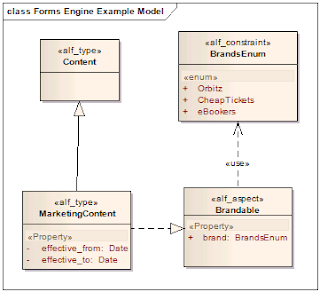
For this example, I will create a custom content type and modify the edit metadata form shown in Alfresco Share. The content type I will create will center around a custom type called MarketingContent, with an additional Aspect called Brandable. This custom metadata will add the ability to identify the 'brand' to which the Marketing content should be associated, and will require a custom single-select drop down.
Step 1 - Setup the project to extend Alfresco with custom content
1. Download Jeff Potts' custom content example source
2. Import into Eclipse - assume you already downloaded the Alfresco SDK and imported SDK AlfrescoRemote
3. Fix project references as needed
4. Update build.properties for ant build (alfresco.sdk.remote.home and alfresco.web.root)
Step 2 - Modify project for new custom content model
Four files to modify:
* PROJECT_HOME/src/alfresco/extension/someco-model-content.xml
* PROJECT_HOME/src/alfresco/extension/scModel.xml
* PROJECT_HOME/src/alfresco/extension/web-client-config-custom.xml
* PROJECT_HOME/src/alfresco/extension/webclient.properties
someco-model-content.xml (renamed to 'orbitz-model-content.xml')
scModel.xml (renamed to 'orbModel.xml')
web-client-config-custom.xml
webclient.properties
Step 3 - Deploy
Make sure that build.properties is properly configured
Step 4 - Test Model
As a prerequisite, you should go to Share client and create a new site (i.e. 'Merchandising')
In order for this form to render, we need to modify the forms configuration to let Share know how to render our custom type and aspect. For details on this, see the forms wiki and forms examples wiki pages.
Step 5: Configure share to render the orb:market_content type and orb:brandable aspect
Create a file named 'web-framework-config-custom.xml' and deploy it to the share/WEB-INF/classes/alfresco/web-extension directory with the contents:
As we see here, we needed to copy all of the default properties from cm:content as well as add our unique properties for orb:marketing_content, and add the orb:brands aspect. This gives us very fine-grained control, but we can see there could be a lot of repeated configurations if we use types with aspects in complex ways.
Step 5: Run the example
Now we can go ahead and restart share and log in and select 'edit metadata' of our content previously checked in with the type orb:marketing_content and set with the orb:brandable aspect.
Now we should see the following:
We customized the selectone.ftl control template to provide our list of brands. One can consider an extension to this control would be to look up this list from a data web-script.
We should create our own selectone lookup from an external source in an ajax way. We will do so in a further blog article.
This example requires Alfresco 3.2 Labs (currently Preview).
Resources:
* Alfresco forms engine wiki page
* Alfresco forms engine examples wiki page
Also see my previous blog entries showing how forms are used in Alfresco Share 3.2
I will use the example project structure offered by Jeff Potts' great article - Extending the Alfresco Content model to extend the content model in Alfresco. For the share customization, I will base my project on the Share extension project example in my blog.
Creating the new Custom content type
For this example, I will create a custom content type and modify the edit metadata form shown in Alfresco Share. The content type I will create will center around a custom type called MarketingContent, with an additional Aspect called Brandable. This custom metadata will add the ability to identify the 'brand' to which the Marketing content should be associated, and will require a custom single-select drop down.

Step 1 - Setup the project to extend Alfresco with custom content
1. Download Jeff Potts' custom content example source
2. Import into Eclipse - assume you already downloaded the Alfresco SDK and imported SDK AlfrescoRemote
3. Fix project references as needed
4. Update build.properties for ant build (alfresco.sdk.remote.home and alfresco.web.root)
Step 2 - Modify project for new custom content model
Four files to modify:
* PROJECT_HOME/src/alfresco/extension/someco-model-content.xml
* PROJECT_HOME/src/alfresco/extension/scModel.xml
* PROJECT_HOME/src/alfresco/extension/web-client-config-custom.xml
* PROJECT_HOME/src/alfresco/extension/webclient.properties
someco-model-content.xml (renamed to 'orbitz-model-content.xml')
<?xml version='1.0' encoding='UTF-8'?>
<!DOCTYPE beans PUBLIC '-//SPRING//DTD BEAN//EN' 'http://www.springframework.org/dtd/spring-beans.dtd'>

<beans>
<!-- Registration of new models -->
<bean id="extension.dictionaryBootstrap" parent="dictionaryModelBootstrap" depends-on="dictionaryBootstrap">
<property name="models">
<list>
   <value>alfresco/extension/orbModel.xml</value>
</list>
</property>
</bean>
</beans>
scModel.xml (renamed to 'orbModel.xml')
<?xml version="1.0" encoding="UTF-8"?>
<!-- Definition of new Model -->
<model name="orb:orbitzmodel" xmlns="http://www.alfresco.org/model/dictionary/1.0">

<!-- Optional meta-data about the model -->
<description>Orbitz Marketing Model</description>
<author>Ed Wentworth</author>
<version>1.0</version>

<!-- Imports are required to allow references to definitions in other models -->
<imports>
  <!-- Import Alfresco Dictionary Definitions -->
  <import uri="http://www.alfresco.org/model/dictionary/1.0" prefix="d" />
  <!-- Import Alfresco Content Domain Model Definitions -->
  <import uri="http://www.alfresco.org/model/content/1.0" prefix="cm" />
</imports>

<!-- Introduction of new namespaces defined by this model -->
<namespaces>
  <namespace uri="http://www.orbitz.com/model/content/1.0" prefix="orb" />
</namespaces>
<constraints>
  <constraint name="orb:brands" type="LIST">
      <parameter name="allowedValues">
          <list>
              <value>Orbitz</value>
              <value>CheapTickets</value>
              <value>eBookers</value>
          </list>
      </parameter>
      <parameter name="caseSensitive"><value>true</value></parameter>
  </constraint>
</constraints>

<types>
  <!-- Enterprise-wide generic document type -->
  <type name="orb:doc">
      <title>Orbitz Document</title>
      <parent>cm:content</parent>
      <mandatory-aspects>
        <aspect>cm:generalclassifiable</aspect>
      </mandatory-aspects>
  </type>

  <type name="orb:marketing_content">
      <title>Orbitz Marketing Content</title>
      <parent>orb:doc</parent>
      <properties>
          <property name="orb:effective_from">
              <type>d:date</type>
          </property>
          <property name="orb:effective_to">
              <type>d:date</type>
          </property>
      </properties>
  </type>
</types>

<aspects>
  <aspect name="orb:brandable">
      <title>Orbitz Brandable</title>
      <properties>
          <property name="orb:brand">
              <type>d:text</type>
              <mandatory>true</mandatory>
              <constraints>
                  <constraint ref="orb:brands"/>
              </constraints>
          </property>
      </properties>
  </aspect>

</aspects>
</model>
web-client-config-custom.xml
<alfresco-config>

<!--  add webable aspect properties to property sheet -->
<config evaluator="aspect-name" condition="orb:brandable">
  <property-sheet>
      <show-property name="orb:brand" display-label-id="brand" />
  </property-sheet>
</config>

<!-- show related documents association on doc property sheet -->
<config evaluator="node-type" condition="orb:doc">
  <property-sheet>
  </property-sheet>
</config>

<!-- show related documents association on whitepaper property sheet -->
<config evaluator="node-type" condition="orb:marketing_content">
  <property-sheet>
      <show-property name="orb:effective_from" display-label-id="effective_from" />
      <show-property name="orb:effective_to" display-label-id="effective_to" />
  </property-sheet>
</config>

<!--  add orbitz types to add content list -->
<config evaluator="string-compare" condition="Content Wizards">
  <content-types>
      <type name="orb:doc" />
      <type name="orb:marketing_content" />
  </content-types>
</config>

<config evaluator="string-compare" condition="Action Wizards">
  <!-- The list of aspects to show in the add/remove features action -->
  <!-- and the has-aspect condition -->
  <aspects>
      <aspect name="orb:brandable"/>
  </aspects>

  <!-- The list of types shown in the is-subtype condition -->
  <subtypes>
      <type name="orb:doc" />
      <type name="orb:marketing_content" />
  </subtypes>

  <!-- The list of content and/or folder types shown in the specialise-type action -->
  <specialise-types>
      <type name="orb:doc" />
      <type name="orb:marketing_content" />
  </specialise-types>
</config>

<config evaluator="string-compare" condition="Advanced Search">
  <advanced-search>
      <content-types>
          <type name="orb:doc" />
          <type name="orb:marketing_content" />
      </content-types>
      <custom-properties>
          <meta-data aspect="orb:brandable" property="orb:brand" display-label-id="brand" />
      </custom-properties>
  </advanced-search>
</config>
</alfresco-config>
webclient.properties
#orb:marketing_content
effective_from=Effective From
effective_to=Effective To

#orb:brandable
brand=Brand
Step 3 - Deploy
Make sure that build.properties is properly configured
- Run ant deploy
Step 4 - Test Model
As a prerequisite, you should go to Share client and create a new site (i.e. 'Merchandising')
- In Alfresco Explorer client - Upload content as type 'Marketing Content'
- Apply 'Brandable' aspect
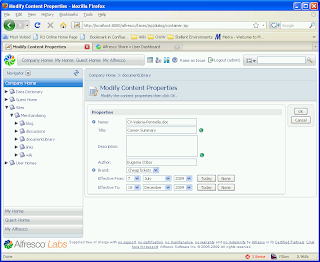
- Modify content propertis -- should look like picture below

In order for this form to render, we need to modify the forms configuration to let Share know how to render our custom type and aspect. For details on this, see the forms wiki and forms examples wiki pages.
Step 5: Configure share to render the orb:market_content type and orb:brandable aspect
Create a file named 'web-framework-config-custom.xml' and deploy it to the share/WEB-INF/classes/alfresco/web-extension directory with the contents:
<alfresco-config>

 <config evaluator="node-type" condition="orb:marketing_content">
    <forms>
       <form>
          <field-visibility>
             <!-- inherited from cm:content -->
             <show id="cm:name" />
             <show id="cm:title" force="true" />
             <show id="cm:description" force="true" />
             <show id="mimetype" />
             <show id="cm:author" force="true" />
             <show id="size" for-mode="view" />
             <show id="cm:creator" for-mode="view" />
             <show id="cm:created" for-mode="view" />
             <show id="cm:modifier" for-mode="view" />
             <show id="cm:modified" for-mode="view" />

             <!--  specific for orb:marketing_content -->
             <show id="orb:effective_from" />
             <show id="orb:effective_to" />

             <!--  aspect orb:brandable -->
             <show id="orb:brand" />

          </field-visibility>
          <appearance>
             <field id="orb:effective_from" label="Effective From"/>
             <field id="orb:effective_to" label="Effective To"/>
             <field id="orb:brand" label="Brand">
                <control template="controls/selectone.ftl">
                   <control-param name="options">Orbitz,CheapTickets,eBookers</control-param>
                </control>
             </field>
          </appearance>
       </form>
    </forms>
 </config>
</alfresco-config>
As we see here, we needed to copy all of the default properties from cm:content as well as add our unique properties for orb:marketing_content, and add the orb:brands aspect. This gives us very fine-grained control, but we can see there could be a lot of repeated configurations if we use types with aspects in complex ways.
Step 5: Run the example
Now we can go ahead and restart share and log in and select 'edit metadata' of our content previously checked in with the type orb:marketing_content and set with the orb:brandable aspect.
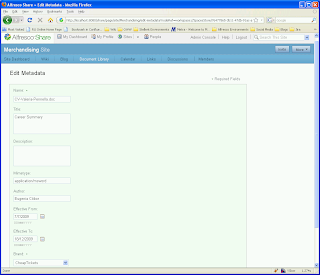
Now we should see the following:

We customized the selectone.ftl control template to provide our list of brands. One can consider an extension to this control would be to look up this list from a data web-script.
We should create our own selectone lookup from an external source in an ajax way. We will do so in a further blog article.
Subscribe to:
Posts (Atom)